Local Linux + native VR VNC
Tokoro paired UserLAnd, OVRVNC, and a Bluetooth keyboard on Oculus Go—adjacent hardware, but important standalone precedent. (Tokoro, 2018; OVRVNC)
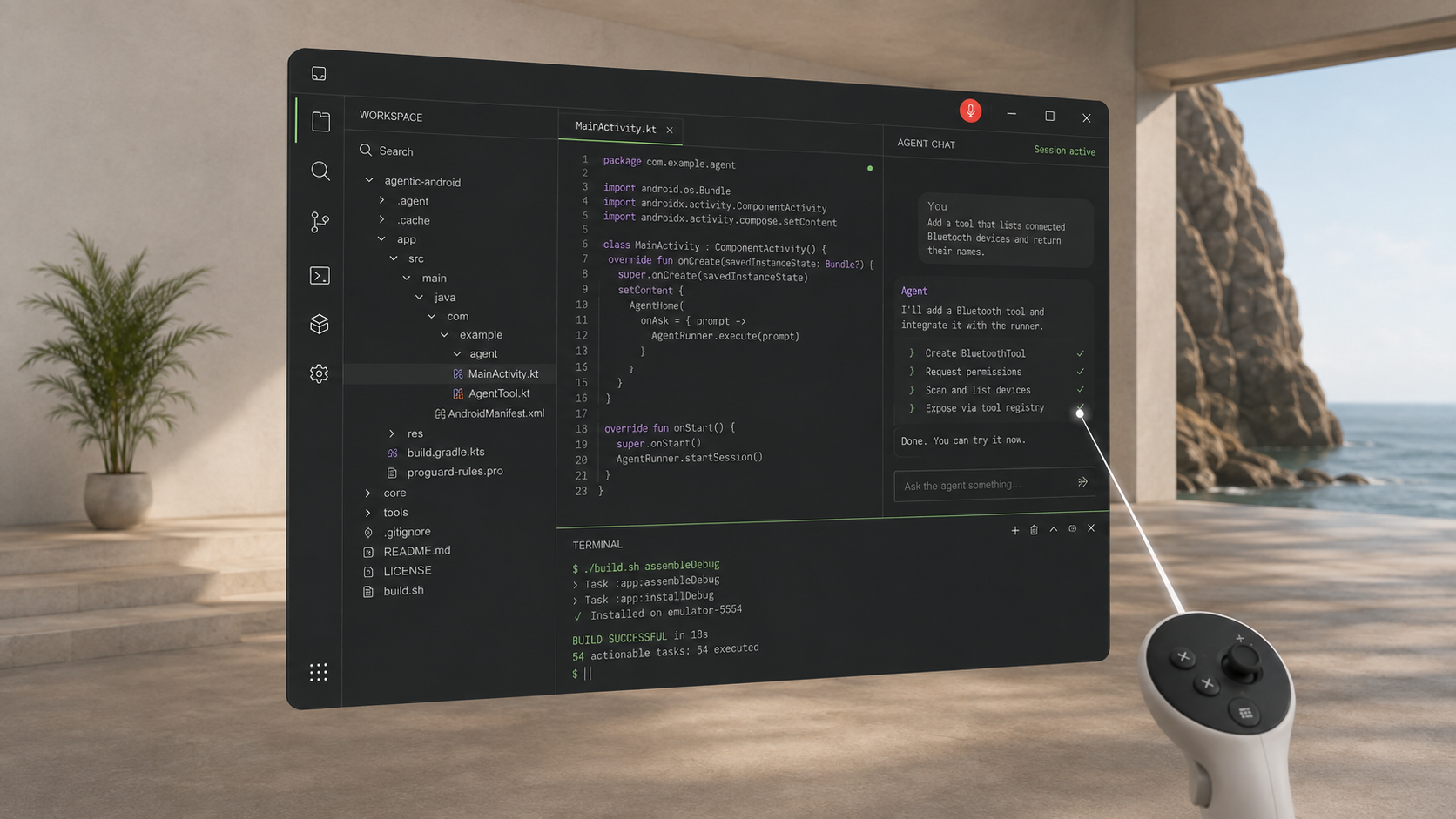
A Termux-powered desktop for Meta Quest, presented through a native Android and Spatial SDK interface.

Termux, Termux:X11 and XFCE own the Linux session. A native Android app carries the pixels and input over device-local loopback.
One shared input system works in both Horizon-managed window mode and a grabbable Spatial SDK panel.
You
Add a small status action and test it.

Codex
I’ll inspect the project, make the change,
run the tests, and show you the diff.

✓ source updated
✓ tests passed
✓ APK assembled
Run the Codex desktop app inside the local Linux environment. Point, right-click, type with a virtual or Bluetooth keyboard, dictate through the Quest microphone, work with Git, and build Android apps on the headset.
Inkscape, camera import and local printing are also validated.
Related work and alternatives
Linux on Quest is established prior work. Local userlands appeared on the original Quest, a Quest 2 demonstration combined XFCE with noVNC, and current projects offer direct Termux:X11, PRoot/VNC, local compatibility runtimes, and remote spatial desktops. Our contribution is this specific local Termux:X11, loopback RFB, and hybrid Spatial SDK integration—not a claim to have invented Linux in a headset. (RangerMauve, 2019; Eternal_Density, 2020)
We make no “first,” “only,” or “unprecedented” claim.
Tokoro paired UserLAnd, OVRVNC, and a Bluetooth keyboard on Oculus Go—adjacent hardware, but important standalone precedent. (Tokoro, 2018; OVRVNC)
The 2019 record establishes a local UserLAnd workflow; the 2020 Quest 2 record supplies the earlier graphical XFCE/noVNC evidence found in this scan.
Direct Termux:X11, UserLAnd, and Andronix/bVNC guides made the conventional local desktop route increasingly accessible. (legokichi; Ben Kaiser; DevWithZachary)
A native Meta Spatial SDK Ubuntu client demonstrated panel-coordinate input, right-click, scrolling, keyboard forwarding, and hardware HEVC decode from an external Linux host. (Hughes, 2026)
A spatial panel is only one design choice. For many users, direct X11 or a mature generic VNC client is the simpler answer; for demanding workloads, a remote Linux workstation can be the better answer.
| Route | Runs on | Presentation | Best fit | Boundary |
|---|---|---|---|---|
| Direct Termux:X11 | Quest | Horizon-managed Android window | The shortest local display path | No application-owned XR panel (legokichi) |
| Andronix / UserLAnd + VNC | Quest | Generic VNC app or browser | Familiar distribution setup and mature client behavior | Normally PRoot and a virtual VNC desktop, not privileged chroot or a Spatial SDK surface (Andronix architecture) |
| DroidDesk | Android / Quest-compatible route | Direct Termux:X11 or its standalone Android app | Consolidated installation and desktop packaging | No Quest-specific spatial renderer was established in the inspected material (DroidDesk) |
| WinlatorXR | Quest | Purpose-built native XR frontend | Locally executing Windows applications | Wine/CPU translation and a local X server, rather than native ARM Linux/XFCE or Meta Spatial SDK (WinlatorXR) |
| Spatial Linux Desktop | Quest | Horizon window or Spatial SDK panel | Local Linux plus Quest-specific input and device bridges | More setup and local transport work; deliberately bounded compatibility |
| Spatial SDK remote desktop | External Ubuntu/PC host | Native video surface and spatial panel | Desktop-class compute and efficient media transport | Requires a host and network (remote-desktop-for-ubuntu; Moonlight-SpatialSDK) |
| WayVR + WiVRn | External Linux host | Linux-native spatial workspace streamed to Quest | Several apps, richer compute, and open Linux XR | Not an Android-hosted local desktop (WayVR; WiVRn) |
Unicode, dead keys, composition, selection, and clipboard behavior are a more consequential adopter gap than another application screenshot. noVNC and mature Android VNC clients are useful protocol references, subject to their licenses. (noVNC)
Direct Termux:X11, retained RFB, and any hardware-video experiment should run the same visible tasks. Local encoding, copies, queueing, decode, text clarity, latency, thermal state, and battery all count.
WinlatorXR and the Ubuntu Spatial SDK client are useful references for direct local rendering boundaries and decoder-to-panel surfaces. Neither proves that a zero-copy Termux:X11 handoff already exists.
Release held input, stop the microphone on interruption, bound reconnects, and authenticate local peers if hostile same-device applications enter the threat model. Loopback limits exposure; it is not per-app authentication.
The Android client, bounded RFB transport, Linux setup, fixtures and validation notes are public and MIT licensed. Third-party applications remain user-installed dependencies under their own terms.