
Monitoring and Control
The app is built for supervised research sessions where the participant should not need to navigate setup or control surfaces inside the headset.
Remote-First Mode
The current working mode is intentionally simple:
- Windows owns the operator controls
- the Quest build is the participant-facing runtime
- triggers come from the desktop app
- tracked config changes are staged from the desktop app
- live state is reported back through ADB snapshots and, when available, LSL streams
This is why the app exposes the Remote-only research control toggle directly
in the main shell.
What To Watch During A Session
ADB-backed checks
Use the app to confirm:
- the active Quest endpoint
- battery level
- CPU and GPU settings
- foreground package and visible activities
- whether the expected package is still running in front
If the current foreground app is outside the public catalog, the operator app keeps the selected target empty. That prevents a false warning state from appearing before you have chosen the real study APK.
Lightweight monitor stream
LSL Monitor is for fast transport confirmation:
- default stream name:
quest_monitor - default stream type:
quest.telemetry - default channel index:
0
If the supplied APK publishes the lightweight monitor outlet, this page gives you the quickest live check.
Twin-state tracking
Twin Monitor is the richer comparison surface:
- bridge status
- live publisher detection
- focused requested/reported inspection by section
- recent twin events without rendering every live value at once
Use this page when you need to verify whether the headset is reporting the state you expect, not just whether the basic monitor stream is alive.
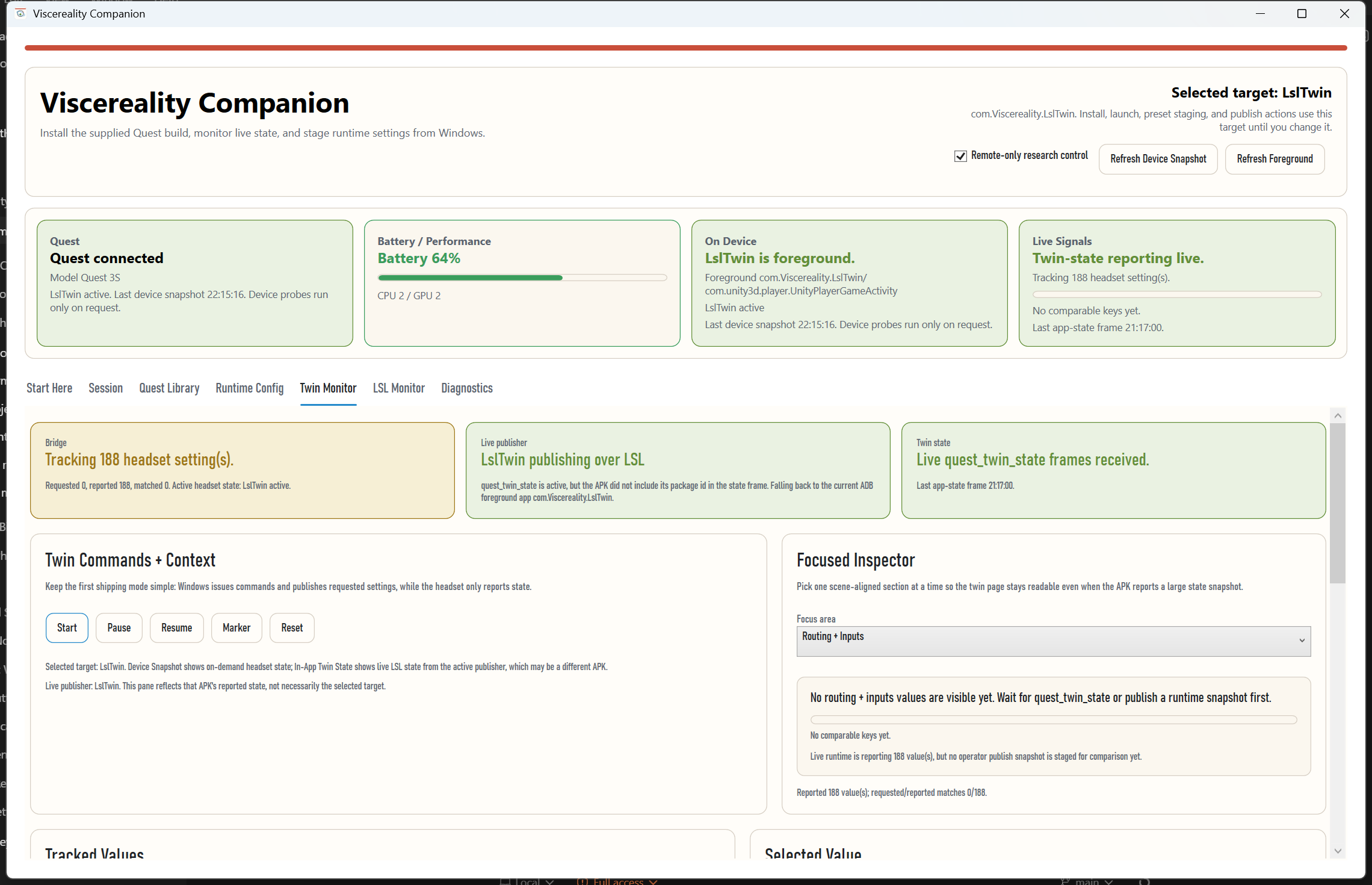
On March 25, 2026, this flow was verified live against Sussex Experiment over Wi-Fi
ADB. The Windows app launched the Quest build, applied CPU 2 / GPU 2, and
tracked 188 reported headset values over quest_twin_state without the tab
crashing.
For study-specific modes such as the Sussex shell, the same twin-state stream is reduced to a much narrower monitor:
- Sussex APK verification
- pinned device-profile verification
- LSL routing and connectivity
- controller breathing, heartbeat, and coherence values
- only the study trigger buttons that are actually allowed
The Sussex verification harness now also spins up a local Windows LSL sender on
HRV_Biofeedback / HRV so the operator app can verify that
the headset is actually resolving and connecting to a live sender on this
machine, not just carrying stale stream configuration. The test signal is the
current Sussex app-side contract: smoothed 0..1 HRV biofeedback values,
where each packet arrival is also treated as a heartbeat event.
What The Operator Can Control Today
- connect the Quest
- install and launch the APK
- apply Quest CPU and GPU levels
- restart monitor subscriptions
- send twin commands such as
start,pause,resume, andmarker - publish tracked runtime-config snapshots from Windows
- export a session manifest
What Is Deliberately Not Required Yet
The first working mode does not depend on the APK exposing its own control UI. That is deliberate. The operator flow is meant to work even when the headset user should only wear the device and follow the study instructions.
Study shells can stay narrower than the main app without losing the signals an
experimenter actually needs. The Sussex shell, for example, now reads camera
drift from the last recenter anchor, particle visibility and suppression state,
and performance telemetry from the public quest_twin_state surface.
The current public Sussex telemetry always confirms LSL inlet connectivity
through study.lsl.*. If a verified build also echoes the routed biofeedback
value on signal01.coherence_lsl or a driver.stream.*.value01 mirror entry,
the harness will derive value-level latency. On the currently verified public
build, that value is echoed, so the public harness can now report routed
biofeedback round-trip latency.